
Online booking and booking embed
Let clients book online 24/7: a hosted booking page, an embed for your own website, a short link for texts and social, walk-ins and waitlists.
A booking page clients finish
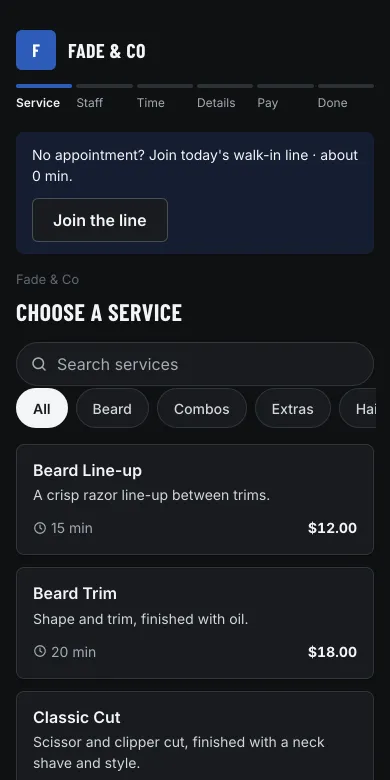
Clients pick a service, a person (or “Any available”), a day and a time, then confirm with their name, email and phone. Days that are full are marked, times are grouped into morning, afternoon and evening, and the page remembers each step if they tap back.
- Services by category, with prices, lengths and search
- Pick a person or let the first free one take it
- Add to Apple Calendar, Outlook or Google Calendar at the end
- A link in every confirmation and reminder to confirm, reschedule, cancel, add a service or update their card
On your website, or ours
Paste two lines into any website to put the booking flow on your own page, or send clients to your hosted page. You can also use your own domain for the hosted page (we set up the certificate).
<div id="mm-booking" data-tenant="your-salon"></div>
<script src="https://book.bookmarvels.com/embed.js" async></script>
Options let a button open the flow, or start it on one service, person or location. See website integration.
Links for every channel
Your Get booked page gives you a QR code and ready-made, tracked links for Google Business Profile, Instagram, Facebook, TikTok and Yelp, plus a short link (bookmarvels.com/b/your-salon) for texts. Reports show which channel each booking came from.
Walk-ins, check-in and waitlists
- Clients join the waitlist from the booking page when no time works; you add phone and walk-in requests
- A walk-in line (barbershops and salons) with live waits that work around your appointments, joined at the door by QR code, on the kiosk or at the desk; texts for "you're #3", "you're next" and "we're ready", and anyone not back in time is taken off the line with a text
- Check-in on a registered tablet (kiosk, with a live board of the line) or with the client's phone by QR code; a printable poster and counter card for each location
- Waitlist auto-fill: when a time frees up, the next person waiting (for that day, person and time window) gets a one-tap link and the time is held for them for 15 minutes (you choose), then the next; or you approve each offer first
- Standing appointments every 1 to 8 weeks, ending after a number of visits or on a date; change one date, this and following, or all; pay at each visit, keep a card on file, or take a deposit from the card a week before
Start taking bookings today
Set up your booking page in minutes. Free with Clover payments.